0 ratings



Item #:
85058053
USB Fingerprint Reader for Windows
76% of respondents would recommend this to a friend
Item #:
85058053
FJD 92
Price Details
Excluding Shipping & Custom charges ( Shipping and custom charges will be calculated on checkout )
*All items will import from US
In stock
 Imported from USA store
QTY:
Order now and get it around Monday, September 28
Secured transaction
Ubuy works hard to protect your security and privacy. Our advanced payment security system ensures confidentiality by encrypting your information during transmission using AES (Advanced Encryption Standards) and SSL (Secure Socket Layer) protocols. Your payment details are 100% secure as we do not share your payment details with third party sellers.
Our Top Logistics Partners


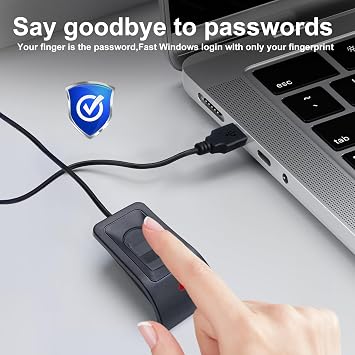
Login on your computer using Microsoft's built-in Windows Hello login feature with just your fingerprint, no need to remember usernames and passwords.

Fast
Shipping

Free
Return*

Secure Packaging

100% Original Products

PCI DSS Compliance

ISO 27001 Certified



Note: Step Down Voltage Transformer required for using electronics products of US store (110-120). Recommended power converters Buy Now.


What Stands Out
Easy Installation
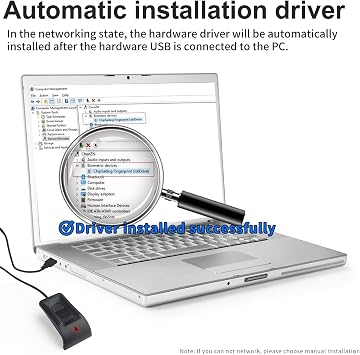
The device offers automatic driver installation, simplifying the setup process for users and ensuring immediate usability without complicated configurations.
Password-Free Access
Eliminate the need for traditional passwords with fingerprint authentication, enhancing security and convenience for Windows 10/11 users seeking effortless access to their devices.
Long Extension Cable
The included 5ft extension cable provides flexible placement options for the fingerprint reader, catering to varied desktop setups and ensuring accessibility from multiple positions.
Product Details
| Connectivity Technology | USB Type A |
| Additional Features | Linux&MAC not supported |
| Compatible Devices | Personal Computer |
| Data Transfer Rate | 5000 megabits_per_second |
| Hardware Interface | USB |
| Slot Count | 10 |
| Operating System | Windows 10 |
| Color | Black |
| Item Dimensions L x W x H | 2.6"L x 1.5"W x 1"H (6.6 x 3.8 x 2.5 cm) |
| Item Highlight | Windows Hello & 10/11, Auto Driver Install, 5ft Cable, Password-Free Login |
| Brand | JIAN BOLAND |
| Number of Items | 1 |
| Unit Count | 1 Count |
| UPC | 717664826555 717664826586 |
| Global Trade Identification Number | 00717664826555 |
| Manufacturer | JIANBOLAND |
| Model Number | WA28 |
| Mfr Part Number | WA28 |
| Special Feature | Linux&MAC not supported |
Who Should Buy?

-
Home Users
Ideal for individuals looking for convenient and secure access without remembering multiple passwords on Windows devices.
-
Office Professionals
Great for professionals needing quick and secure login access to Windows devices while maintaining productivity.
-
Tech Enthusiasts
Perfect for users who enjoy utilizing advanced technology for security and are familiar with biometric devices.

-
Mac Users
This fingerprint reader is specifically designed for Windows and is not compatible with Mac operating systems.
Product Description
Have any Query? Chat with us
Customer Questions & Answers
-
Question:
What operating systems are compatible with the JIANBOLAND USB Fingerprint Reader?
Answer: The JIANBOLAND USB Fingerprint Reader is compatible with Windows 10 and Windows 11. This allows users to take advantage of Windows Hello, which provides enhanced security with easy biometric login. The reader's seamless integration ensures that you can access your device quickly without needing to remember complex passwords. It's particularly useful in office environments where multiple logins are required, promoting both security and efficiency. -
Question:
How does the automatic driver installation feature work?
Answer: The JIANBOLAND Fingerprint Reader features automatic driver installation, making setup a straightforward process. Once connected to your Windows device, the required drivers are automatically downloaded and installed, eliminating the need for manual configuration. This feature is beneficial for users who may not be technically inclined or those who prefer a plug-and-play experience. It's ideal for quick deployments in business settings or for user convenience at home. -
Question:
What is the length of the extension cable included with the fingerprint reader?
Answer: The JIANBOLAND USB Fingerprint Reader comes with a 5ft extension cable. This length offers flexibility in placement, enabling users to position the fingerprint reader conveniently on their workspace. Whether you're working at a desktop or using a laptop, this extension allows for an optimal setup that minimizes clutter while ensuring easy access to the reader for quick logins. This setup is particularly advantageous in shared workspaces. -
Question:
Can multiple users utilize the JIANBOLAND USB Fingerprint Reader?
Answer: Yes, the JIANBOLAND USB Fingerprint Reader supports multiple user profiles. Each user can store their fingerprint for secure access, making it suitable for shared devices in homes or offices. This feature enhances convenience by allowing different people to use the same computer efficiently, while maintaining personalized security settings. For instance, family members can securely access their accounts without compromising individual data. -
Question:
Is the fingerprint reader secure for sensitive data?
Answer: Absolutely, the JIANBOLAND USB Fingerprint Reader provides a highly secure method for protecting sensitive data. It uses advanced biometric technology that is more secure than traditional passwords, as fingerprints are unique to each individual. This level of security is crucial for users handling sensitive information, such as in finance or health sectors, ensuring that only authorized users gain access to confidential files and accounts. -
Question:
How does the fingerprint recognition speed compare to traditional password entry?
Answer: The fingerprint recognition speed is significantly faster than traditional password entry. Generally, users can unlock their devices in just a fraction of a second with a simple touch, compared to typing passwords which takes longer. This efficiency is especially valuable in high-paced work environments where time is of the essence, allowing users to log in quickly and focus on their tasks rather than struggling with password memorization. -
Question:
What should I do if the fingerprint reader does not recognize my fingerprint?
Answer: If the JIANBOLAND USB Fingerprint Reader does not recognize your fingerprint, first ensure that your finger is clean and dry. If recognition issues persist, consider re-registering your fingerprint by deleting the old entry and scanning your finger again. This ensures that the reader accurately captures your fingerprint. This troubleshooting is useful for maintaining optimal performance, as environmental factors can affect recognition accuracy. -
Question:
What are the benefits of using a fingerprint reader over conventional passwords?
Answer: Using a fingerprint reader like the JIANBOLAND device provides several benefits such as enhanced security, convenience, and speed. Unlike passwords that can be forgotten or stolen, fingerprints are unique and more difficult for intruders to replicate. This makes accessing your device faster and simpler. Ideal for anyone who values time savings and extra protection against unauthorized access, particularly in environments where securing data is paramount. -
Question:
Can I use this fingerprint reader with third-party applications?
Answer: Yes, the JIANBOLAND USB Fingerprint Reader is compatible with various third-party applications that support biometric logins through Windows Hello. This capability allows for seamless integration with additional security-relevant software, enhancing user security across multiple platforms. Users can simplify access to password-protected applications like banking or sensitive software, making it an excellent choice for professionals who manage various tasks. -
Question:
Where can I buy the JIANBOLAND USB Fingerprint Reader?
Answer: You can buy the JIANBOLAND USB Fingerprint Reader from Ubuy, which offers a wide selection of genuine products and delivers to Fiji. Ubuy is known for its extensive inventory and user-friendly shopping experience, ensuring you can find this device easily. Additionally, Ubuy provides helpful customer support and a reliable platform for all your tech needs.
JIAN BOLAND Biometrics WA28 Editorial Review


No editorial reviews found
Customer Reviews & Ratings
431 customers ratings
-
5 Star
49%
-
4 Star
18%
-
3 Star
11%
-
2 Star
4%
-
1 Star
18%
Review this product
Share your thoughts with other customers
Platform Trust & Buyer Confidence

JK
Jasmin
Verified buyer
“Great products and very good service: very easy and very fast international delivery.”
9 September 2026 · via Trustpilot
AG
Anke
Verified buyer
“Wonderful online shopping experience, smooth transaction from the start. Payment method works conveniently and delivery is unexpectedly fast and reliable. You go the extra mile for service. What makes this even more amazing, you deliver to Namibia. I will remain a happy Ubuy customer and will increase my purchases for sure! Thank you!”
10 September 2026 · via Trustpilot
H
Hazel
Verified buyer
“Very easy to find the products what you need, and so fast delivery, that’s why I highly recommended to others costumers to used ubuy.”
10 September 2026 · via Trustpilot
O
Opaleye
Verified buyer
“I received exactly what I ordered I was skeptical about your site because that was my first time to order. But the order came timely and neatly packaged. I was not disappointed. Thank you.”
11 September 2026 · via Trustpilot
AC
Adele
Verified buyer
“Easy to find and order what you want on the website. Delivery is quick to the UK”
8 September 2026 · via Trustpilot
Secure Checkout
Global Delivery
Easy Returns
Genuine Products
Product Price History
Important information
- Limitations : For products shipped internationally, please note that any manufacturer warranty may not be valid; manufacturer service options may not be available; product manuals, instructions, and safety warnings may not be in destination country languages; the products (and accompanying materials) may not be designed in accordance with destination country standards, specifications, and labeling requirements; and the products may not conform to destination country voltage and other electrical standards (requiring use of an adapter or converter if appropriate). The recipient is responsible for assuring that the product can be lawfully imported to the destination country. When ordering from Ubuy or its affiliates, the recipient is the importer of record and must comply with all laws and regulations of the destination country.
- Not all the products listed on Ubuy are for sale, as Ubuy is a global search engine. Products are subject to export/trade regulations.
FJD 92
Order now and get it around Monday, September 28
This item is not restrict in my country.(Please click on above link if this item is not restrict in your country, So our team will review and allow.)
QTY:
Secured transaction
PCI DSS compliant and ISO 27001:2022 certified, with encrypted payments and full buyer protection on every order.
Our Top Logistics Partners
Fastest cross-border delivery
Features & Benefits
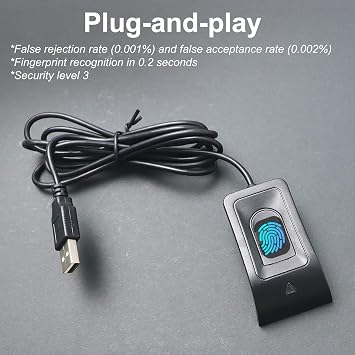
- Effortless login with just a fingerprint
- Supports Win 10/11 32/64 bit
- No drivers needed for most computers
- Can store up to 10 different fingerprints
- Fast recognition speed of less than 0.5 seconds
- Exceptional after-sales service by JIANBOLAND
Ubuy Assurance
Experience worry-free shopping with 100% original products, PCI DSS-compliant payment security, ISO 27001-certified data protection, the fastest cross-border delivery, free returns *, and secure packaging on every order.