- Home Page /
- Software /
- Education & Reference /
- Typing /
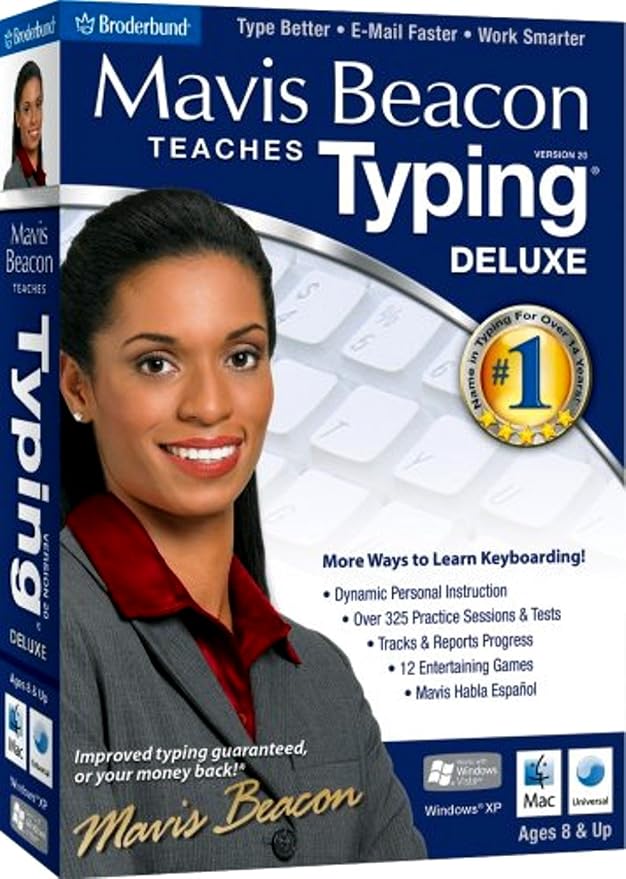
- Mavis Beacon Teaches Typing Deluxe 20 - Old Version
0 ratings




Item #:
10894641
Mavis Beacon Teaches Typing Deluxe 20 - Old Version
83% of respondents would recommend this to a friend
Item #:
10894641
FJD 165
Price Details
Excluding Shipping & Custom charges ( Shipping and custom charges will be calculated on checkout )
*All items will import from US
0 ratings
Write a review
In stock
 Imported from USA store
QTY:
Order now and get it around Sunday, September 20
Secured transaction
Ubuy works hard to protect your security and privacy. Our advanced payment security system ensures confidentiality by encrypting your information during transmission using AES (Advanced Encryption Standards) and SSL (Secure Socket Layer) protocols. Your payment details are 100% secure as we do not share your payment details with third party sellers.
Our Top Logistics Partners


Learn with Mavis Beacon and get results quicker than any other typing program--guaranteed!

Fast
Shipping

Free
Return*

Secure Packaging

100% Original Products

PCI DSS Compliance

ISO 27001 Certified



Note: Step Down Voltage Transformer required for using electronics products of US store (110-120). Recommended power converters Buy Now.


What Stands Out
Engaging Lessons
Mavis Beacon offers interactive and engaging typing lessons, making learning fun and effective for users of all ages, ensuring they stay motivated to practice and improve their skills.
Comprehensive Tracking
The software provides detailed progress tracking and personalized feedback, allowing users to monitor their typing speed and accuracy over time, enhancing the learning experience.
User-Friendly Interface
Designed with simplicity in mind, Mavis Beacon's user-friendly interface allows for easy navigation and accessibility, catering to both beginners and experienced typists looking to refine their skills.
Product Details
| Package Dimensions | 7.6 x 5.3 x 1.3 inches (19.3 x 13.5 x 3.3 cm); 3.2 ounces (90.72 grams) |
| Item model number | 15050 |
| Date First Available | April 2, 2008 |
| Manufacturer | Encore |
Who Should Buy?

-
Beginners in Typing
Ideal for novice typists seeking structured lessons and practice to develop foundational typing skills effectively.
-
Home Schooling
Excellent resource for home educators who want to integrate typing skills into their curriculum for children.
-
Casual Users
Great for individuals who wish to improve their typing speed and accuracy without a significant time commitment.

-
Professional Typists
Experienced typists seeking advanced techniques and speed enhancements may find the content too basic and unchallenging.
Product Description
About This Item
Introducing Mavis Beacon Teaches Typing Deluxe 20 - Old Version Master the art of typing with Mavis Beacon Teaches Typing Deluxe 20 - Old Version. Whether you're a beginner or looking to improve your typing skills, this software is designed to help you become a typing pro in no time. With Mavis Beacon Teaches Typing Deluxe 20 - Old Version, you'll have access to a comprehensive typing program that includes engaging lessons, interactive games, and personalized training sessions. This old version of the software provides a classic yet effective learning experience that has helped millions of individuals improve their typing skills. This software is perfect for individuals who prefer the simplicity and familiarity of the old version.
It offers the same great features as the newer versions, but with a nostalgic touch. The user-friendly interface allows you to navigate through the program seamlessly, making it suitable for users of all ages. Mavis Beacon Teaches Typing Deluxe 20 - Old Version includes a wide range of typing lessons that cover everything from basic typing techniques to advanced speed and accuracy training. The program adapts to your skill level, providing customized lessons and exercises to ensure your progress. In addition to the lessons, this software also offers interactive games that make learning to type fun and engaging.
You can challenge yourself with timed exercises, compete with friends, and track your progress to see how much you've improved over time. Whether you're a student, professional, or just someone looking to enhance their typing skills, Mavis Beacon Teaches Typing Deluxe 20 - Old Version is the perfect choice for you. It offers a comprehensive typing program that is both entertaining and educational. Don't let the old version fool you - Mavis Beacon Teaches Typing Deluxe 20 - Old Version is a tried and tested software that has helped countless individuals become proficient typists. Get your hands on this classic typing program and unlock your full typing potential today.
Have any Query? Chat with us
Customer Questions & Answers
-
Question:
What are the system requirements for Mavis Beacon Teaches Typing Deluxe 20?
Answer: Mavis Beacon Teaches Typing Deluxe 20 typically requires a PC with Windows OS, or Mac for compatibility. It operates effectively on systems with a minimum of 1 GHz processor and 2GB RAM. Additionally, you'll need at least 500MB of hard drive space for installation. Keeping your operating system updated ensures optimal performance of the software, providing a smooth typing experience. This software is ideal for students, professionals, and anyone looking to enhance their typing skills. -
Question:
Is Mavis Beacon Teaches Typing Deluxe 20 suitable for all age groups?
Answer: Yes, Mavis Beacon Teaches Typing Deluxe 20 is designed for users of all ages. The program features various levels and lessons tailored for beginners to advanced typists, which makes it ideal for children learning to type, as well as adults looking to improve their skills. The engaging and interactive lessons keep users motivated and help them develop both speed and accuracy. Furthermore, teachers and parents can use this tool to track progress, making it a versatile option for educational environments. -
Question:
Can I use Mavis Beacon Teaches Typing Deluxe 20 on a Mac?
Answer: Yes, Mavis Beacon Teaches Typing Deluxe 20 is compatible with Mac systems, but it's important to check the specific version requirements for your OS. The program runs smoothly on most recent versions of macOS. Using the software on a Mac provides accessibility to its diverse range of lessons and typing games, helping users improve their skills in a fun way. Ensure your Mac meets the minimum requirements for an uninterrupted experience. -
Question:
What typing techniques does Mavis Beacon Teaches Typing Deluxe 20 teach?
Answer: Mavis Beacon Teaches Typing Deluxe 20 focuses on a variety of typing techniques, including touch typing, proper finger placement, and posture. The program utilizes lessons, drills, and engaging games that emphasize these core techniques, helping users to master the keyboard confidently. By practicing these fundamentals, users can increase their speed and reduce errors. This makes it a great resource for students preparing for exams or professionals who need efficient typing skills for their jobs. -
Question:
Can Mavis Beacon Teaches Typing Deluxe 20 be used without an internet connection?
Answer: Yes, Mavis Beacon Teaches Typing Deluxe 20 can be used offline. Once installed, you can access all lessons and practice sessions without needing an internet connection. This allows for flexibility in where and when you practice your typing skills, making it perfect for users who may not always have internet access. It’s beneficial for individuals in different environments, whether at school or in a quieter home setting, ensuring uninterrupted learning. -
Question:
How does Mavis Beacon Teaches Typing Deluxe 20 track progress?
Answer: Mavis Beacon Teaches Typing Deluxe 20 includes built-in progress tracking features that monitor your typing speed, accuracy, and improvement over time. Users can view detailed reports and benchmarks that highlight areas of strength and those needing improvement. This feedback is invaluable, especially for educators and parents wanting to gauge a student's development. By tracking progress, users can tailor their practice focus and achieve their typing goals more effectively. -
Question:
What types of lessons are included in Mavis Beacon Teaches Typing Deluxe 20?
Answer: Mavis Beacon Teaches Typing Deluxe 20 offers a comprehensive array of lessons, including basic typing drills, speed-building exercises, and engaging games to reinforce learning. These lessons cover various topics and challenges designed to enhance both the speed and accuracy of typing. Additionally, users are exposed to various text formats, which help in transitioning typing skills to real-world scenarios such as writing emails or reports. This diverse lesson structure ensures a well-rounded learning experience. -
Question:
Is Mavis Beacon Teaches Typing Deluxe 20 good for improving typing speed?
Answer: Absolutely, Mavis Beacon Teaches Typing Deluxe 20 is specifically aimed at enhancing typing speed and efficiency. The structured lessons progressively challenge users, helping them to gradually increase their words per minute while maintaining accuracy. This practice is crucial for anyone who needs to type quickly for school assignments or professional documentation. Consistent use of the program can lead to noticeable improvements in typing speed that boost confidence in using keyboards. -
Question:
Can Mavis Beacon Teaches Typing Deluxe 20 be used in classroom settings?
Answer: Yes, Mavis Beacon Teaches Typing Deluxe 20 is an excellent resource for classroom environments. Educators can utilize the software to create a structured typing curriculum, allowing students to practice and improve their skills at their own pace. The tracking features are great for monitoring progress, and the interactive nature of the lessons keeps students engaged. This makes it a valuable addition to any educational setting looking to enhance students' computer literacy. -
Question:
Where can I buy Mavis Beacon Teaches Typing Deluxe 20 in Fiji?
Answer: You can purchase Mavis Beacon Teaches Typing Deluxe 20 from Ubuy in Fiji. Ubuy offers an extensive selection of software products, including educational tools like Mavis Beacon. Shopping through Ubuy ensures a user-friendly experience, allowing you to benefit from competitive pricing and detailed product descriptions. This makes it easier to find exactly what you need for your typing improvement journey.
Encore Typing 15050 Editorial Review
Mavis Beacon Teaches Typing Deluxe 20 is a highly recommended typing program that is easy to use and suitable for homeschooling. It is user-friendly and offers a range of personalization options. The program works well and has been helpful for both adults and children. However, it is an old version and may not be compatible with newer operating systems like Windows 10 or Chromebooks. Additionally, it does not come with a keyboard overlay.
Customer Reviews & Ratings
132 customers ratings
-
5 Star
55%
-
4 Star
12%
-
3 Star
12%
-
2 Star
10%
-
1 Star
11%
Review this product
Share your thoughts with other customers
Pros
- Easy to use
- Suitable for homeschooling
- User-friendly
- Personalization options
- Helpful for both adults and children
Cons
- May not be compatible with newer operating systems
Platform Trust & Buyer Confidence

MA
Mohammad
Verified buyer
“Excellent quality and original too,when ubuy send original things I will appreciate that ,I very satisfied thank you”
23 July 2026 · via Trustpilot
CK
Chitra
Verified buyer
“The order and delivery progress was communicated very well. Package arrived within the estimated time. Products arrived as expected in good condition.”
22-Jul-26 · via Trustpilot
K
kund
Verified buyer
“Good supply of products. Safe payment methods, and shipment worldwide! Genuine products.”
23-Jul-26 · via Trustpilot
OO
Onesi
Verified buyer
“Was my first time buying a product from Ubuy, but I found it so helpful. This is reliable. Gonna place a new order!”
22 July 2026 · via Trustpilot
SJ
SAO JOHN
Verified buyer
“Ubuy is a great online platform to buy stuff. Reliable, fast delivery time and great value for money. I've been using Ubuy online shopping platform for three years now and will continue to do so.”
23 July 2026 · via Trustpilot
Secure Checkout
Global Delivery
Easy Returns
Genuine Products
Product Price History
Important information
- Limitations : For products shipped internationally, please note that any manufacturer warranty may not be valid; manufacturer service options may not be available; product manuals, instructions, and safety warnings may not be in destination country languages; the products (and accompanying materials) may not be designed in accordance with destination country standards, specifications, and labeling requirements; and the products may not conform to destination country voltage and other electrical standards (requiring use of an adapter or converter if appropriate). The recipient is responsible for assuring that the product can be lawfully imported to the destination country. When ordering from Ubuy or its affiliates, the recipient is the importer of record and must comply with all laws and regulations of the destination country.
- Not all the products listed on Ubuy are for sale, as Ubuy is a global search engine. Products are subject to export/trade regulations.
FJD 165
Order now and get it around Sunday, September 20
This item is not restrict in my country.(Please click on above link if this item is not restrict in your country, So our team will review and allow.)
QTY:
Secured transaction
PCI DSS compliant and ISO 27001:2022 certified, with encrypted payments and full buyer protection on every order.
Our Top Logistics Partners
Fastest cross-border delivery
Ubuy Assurance
Experience worry-free shopping with 100% original products, PCI DSS-compliant payment security, ISO 27001-certified data protection, the fastest cross-border delivery, free returns *, and secure packaging on every order.